
Have you been using AI for genealogy, or does it scare you? Maybe you haven’t even thought about the possibility.
While technology can sometimes feel intimidating, you don’t need to be a tech expert to benefit from artificial intelligence. In fact, you are probably already using it more than you think! AI works behind the scenes in many ways, making your technology experience more seamless. For example, tools like Siri, Alexa, and Google Assistant are powered by AI. They use natural language processing to understand your commands. Furthermore, they learn and get better over time. Smarthome devices like Nest thermostats and Ring doorbells also use AI to learn your routines and automate responses. Spam filters, social media algorithms, and grammar tools like Grammarly also use AI to help make your technology experience better.
For genealogy research, AI might be one of the most accessible tools we can utilize, and in this series, I will show some simple ways beginners can start intentionally using AI to streamline the research and writing process.
Understanding AI in Family History
When we talk about artificial intelligence in genealogy, we’re really talking about tools that can help with pattern recognition, language processing, and task automation. Think of AI as a research assistant that never gets tired, can read faster than humanly possible, and helps organize information in useful ways.
Just as you have used AI in many different ways when using technology in your everyday life, you’ve likely already encountered AI tools in your genealogy research without even realizing it. FamilySearch has integrated AI features that can search your tree, find sources, and answer genealogical questions. Many genealogists are also using tools like ChatGPT, Claude, Gemini, and Perplexity to enhance their research.
The key is understanding that AI is a tool for collaboration, not replacement. Your genealogical knowledge and experience are still important. AI simply helps you work more efficiently.
Five Ways AI Can Assist Your Research
Research Consultant: When you are stuck on a brick wall ancestor, you can ask AI to suggest record types you haven’t yet explored or alternative spellings you might try. For example, you can ask, “What historical records should I search for someone who lived in Franklin County, Pennsylvania, in the 1840s?” The suggestions that AI provides can help you form a research plan.
Document Interpreter: Historical documents can be challenging. Legal language, faded handwriting, and archaic terminology often slow us down. AI can help translate these into plain English, making them easier to understand and analyze.
Information Organizer: Creating tables from wills, organizing census information, or building timelines becomes much faster with AI assistance. Instead of manually formatting data, you can ask AI to organize it for you.
Story Creator: If you struggle with writing, AI can help you craft compelling narratives about your ancestors. You provide the facts; AI helps with structure and flow. You then personalize it with your own voice and insights.
Research Strategist: Sometimes we need fresh perspectives. AI can suggest creative research strategies or help us think about our ancestors’ lives in new ways.
Getting Started with FamilySearch AI
If you’re ready to try AI in your family history work, an easy place to start is with the tools already available on FamilySearch.org. After logging in and navigating to an ancestor’s profile page, you will see an AI Research Assistant banner at the top of the page:
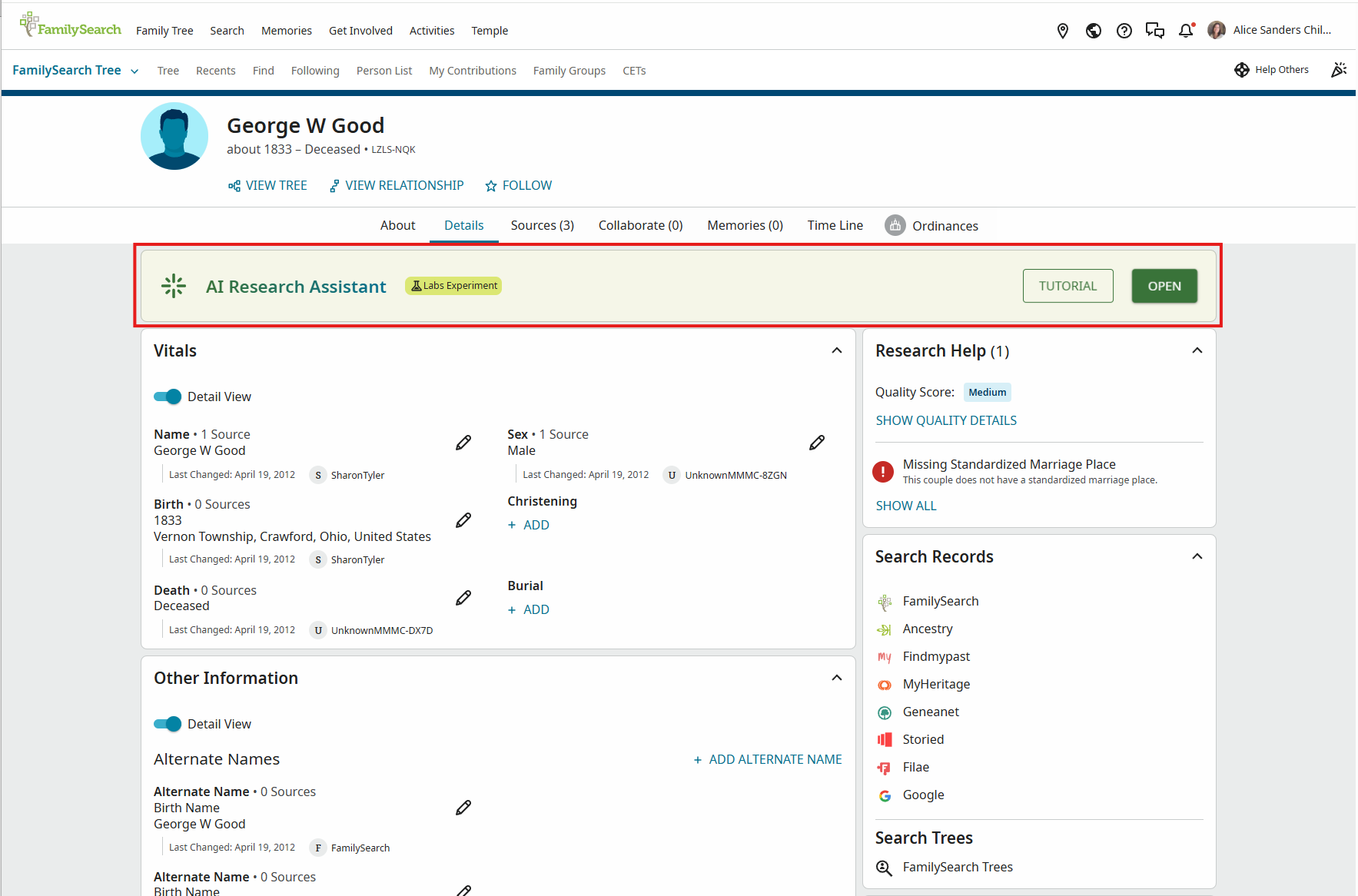
Clicking on Open will open a context window on the right side of the screen:
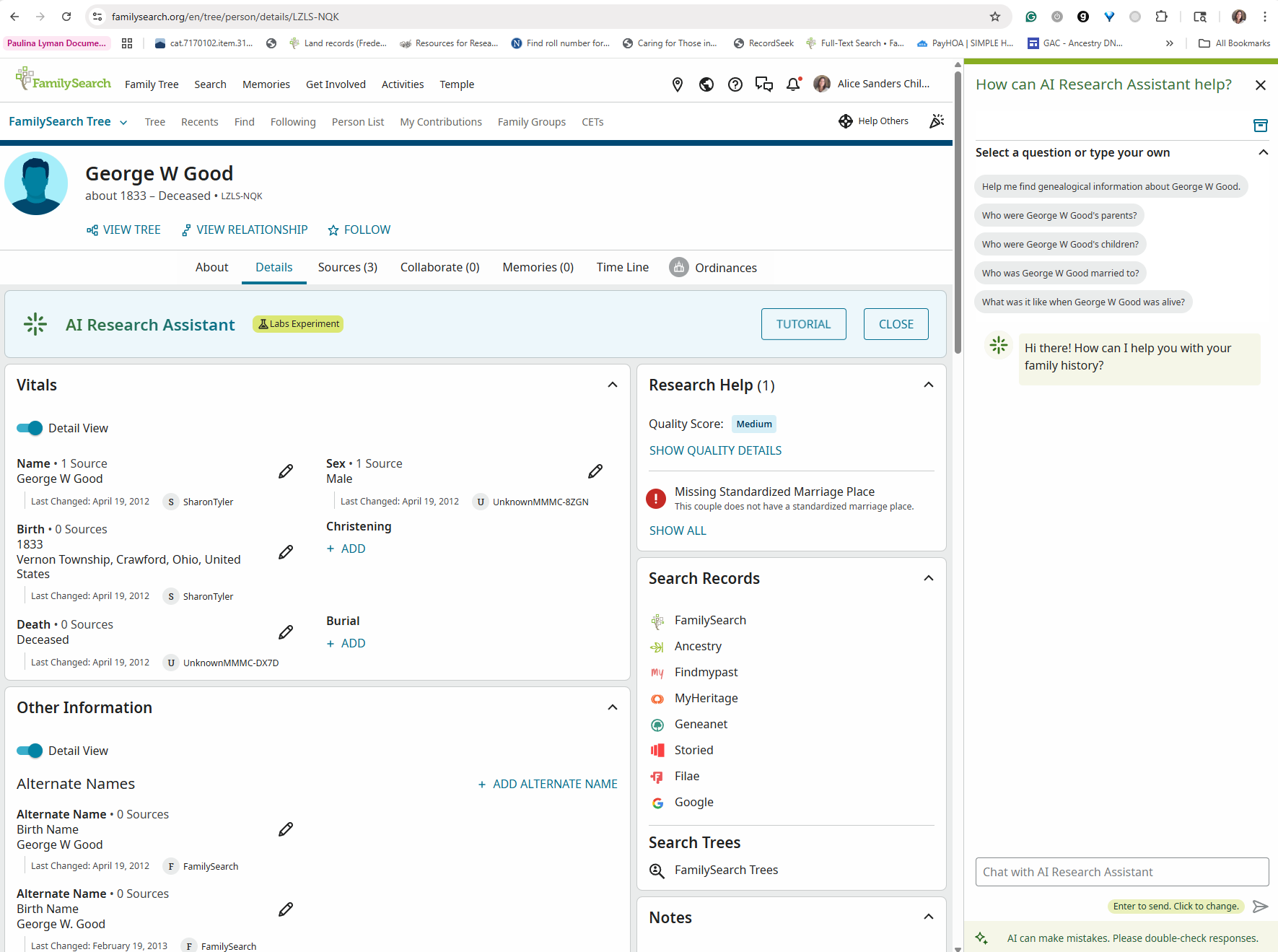
The assistant will suggest some questions you can ask. Click on one of those, or ask your own question by typing it into the box at the bottom of the context window, and the AI Research Assistant will help you find sources about specific ancestors, answer genealogical questions, and suggest additional research resources. It can even provide historical context to help you learn what life was like when your ancestor was alive.
Moving Forward with Confidence
If you are feeling hesitant about using AI, remember it’s normal feel trepidation surrounding new technology. New tools can feel overwhelming. But remember, you don’t need to understand how AI works to benefit from it—just like you don’t need to understand the mechanics of a car to drive one.
The FamilySearch AI Research Assistant is a good way to begin experiencing some ways AI can help you in your family history endeavors. Ask one question. See what happens. As you gain confidence, you’ll discover more ways AI can support your family history work.
This Week’s Challenge
I invite you to take these three steps this week:
- Access the AI Research Assistant on FamilySearch.org. Just one click of a button can open up new possibilities for your research.
- Ask one question about an ancestor you’re researching. Keep it specific: “Where should I look next for information about [name] who lived in [place] around [time]?”
- Share what you discover. Tell a family member or friend about what the AI Research Assistant suggested. You might inspire someone else to try it too.
I’d love to hear your experiences with the AI Research Assistant! Leave a comment below and tell me what you found!
Disclosure: Last October, I presented a talk titled “Using AI as Your Digital Family History Assistant to a group of people with varied experience and interest in genealogy. I recently uploaded my presentation to Claude.ai and asked it to create a series of four blog posts based on the principles in the attached presentation. I then asked it to make each post 600-1200 words and include calls to action with each post. The wording in the first output seemed very unlike me, so I next asked Claude to reword the posts in the style of the posts on my blog and gave it the URL to my blog. The second output was much more accessible and friendly. I have used Claude’s suggested posts as a starting point for the posts in this series, editing and adjusting them to make sure the final product was what I wanted.
Have you used AI to help in this way? I’d love to hear your experiences!
